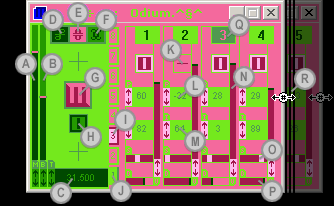
| A
|
master volume
Control+click to change by 10. Right-click to reset. |
| B
|
base pitch
Control+click to change by one octave (12 half-steps). Right-click
to reset. |
| C
|
tempo Timed
in either beats per minute or samples per measure
(for syncing with BackToBasics). Changes by multiples of TROT
(twelfth root of two, equal to a digital sample pitch-shifted by
one half-step). Control+click to change the tempo in multiples
of two. |
| D
|
file menu
|
| E
|
edit menu |
| F
|
MIDI menu Channel 10
(in the Channel sub-menu) is the General MIDI value for drum
sounds. |
| G
|
play The spacebar
also activates this button. Control+click or spacebar+click
to trigger the active window only. |
| H
|
master mute |
| I
|
active (playing) loop
Press keys 1-8 to switch loops. Right click to change settings. |
| J
|
selected loop Each of
the eight loops contains up to sixteen notes, depending on the window
size (see R below). Right click to change settings. |
| K
|
mute Shift+click
inverts all visible notes. Alt+shift+click sets the mute
for all visible notes equally. |
| L
|
pitch Control+click
to change by one octave (12 half-steps). For MIDI channel 10, this
changes the drum type instead. Shift+click changes all visible
notes relative to the control clicked. Alt+shift+click sets
all visible notes equal to the control clicked. More than one note can be triggered
on each beat by entering multiple pitch values separated by a comma
(ex: 1,-12,24,7). (NEW) |
| M
|
instrument Control+click
to change by 10. For MIDI channel 10, this changes the drum kit.
Shift+click changes all visible notes relative to the control
clicked. Alt+shift+click sets all visible notes equal to
the control clicked. Right-click to
bring up the General MIDI instrument menu. (NEW) |
| N
|
volume Control+click
to change by 10. Shift+click changes all visible notes relative
to the control clicked. Alt+shift+click sets all visible
notes equal to the control clicked. |
| O
|
stereo pan Shift+click
changes all visible notes relative to the control clicked. Alt+shift+click
sets all visible notes equal to the control clicked. |
| P
|
duration Shift+click
changes all visible notes relative to the control clicked. Alt+shift+click
sets all visible notes equal to the control clicked. Sets the duration from 0 to 16
or infinity in polyphonic mode. (NEW) |
| Q
|
active (playing) note |
| R
|
window size Sets the
loop length. Works best if the Windows Effect "Show window
contents while dragging" is turned on. |
| |
troubleshooting |
| |
timing issues : The advanced power-saving of some computers, especially
certain laptops, can disrupt the high-resolution timer used in the
Wizard Master Control Program. If you notice timing problems, try
disabling the Use High-Res Timer menu item (version 2.007+)
in the functions menu (see F
above).
|